

You know that moment when guests ask for your WiFi password, and you end up spelling out a jumble of letters and numbers for the third time? A simple WiFi password sign solves that awkward dance while adding a thoughtful touch that makes guests feel instantly welcome.
The best part? This is a super quick project that you can customize to match your style, whether you love painting, prefer printables, or want to go full modern with a QR code. Let’s dive in!
Option 1: Hand-Painted Wooden WiFi Password Sign (My Personal Favorite!)

There’s something so charming about a handmade touch, and this little painted sign adds personality while being practical.
What You’ll Need:
👉 Grab your free Wifi password signs project sheet here: Download the FREE WiFi Password Signs Project Sheet
- Small unfinished or pre-painted wooden hang tag (about 6″ x 3″ works perfectly)
- Optional jute twine for the hanger
- Acrylic paint and/or paint pens in your favorite colors
- Small paintbrush (if not using paint pens)
- A mini easel for display
- Clear topcoat sealer
| Supplies | Description | Features | Price |
|---|---|---|---|
 | (Under $30) | Shop on Amazon | |
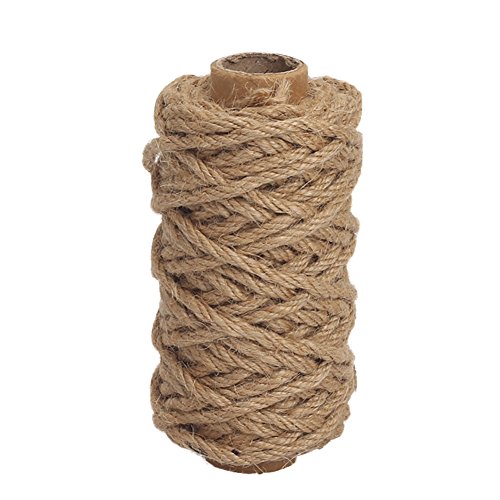 | (Under $9) | Shop on Amazon | |
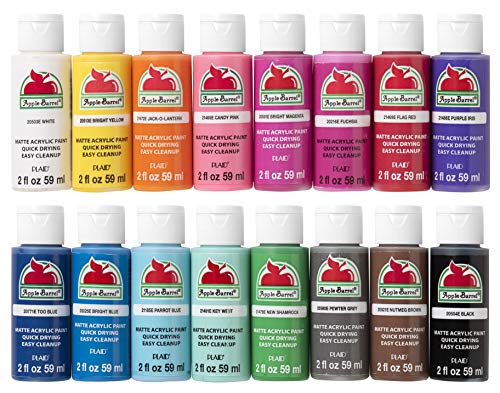 | (Under $30) | Shop on Amazon | |
 | (Under $7) | Shop on Amazon | |
 | (Under $15) | Shop on Amazon | |
 | (Under $9) | Shop on Amazon |
Paint a WiFi Password Sign:
I started with a pre-painted wooden hang tag that had the jute already attached. If you start with an unfinished hang tag, paint both sides with your base color and allow it to dry before you add the string hanger.
Paint a simple design on the front—I went with a script “WiFi” icon with an old-timey key for that vintage, welcoming vibe. For a hard copy of the graphic, download and print your FREE WiFi password signs project sheet. You could also do a simple house icon, coffee cup, or even just pretty lettering. Keep it simple and don’t stress about perfection—the handmade charm is what makes it special!

On the back, neatly write or stencil your network name and password. Seal everything with a clear topcoat to keep it looking fresh even with regular use.
Display it on a small easel (a dollar store find!) wherever your guests gather most.
Option 2: Quick Printable WiFi Password Sign Solutions (For the “I Need This Done Now” Moments)
Not in a painting mood? No problem! Sometimes the fastest solution is the best solution.
Mini WiFi Password Sign in a Magnetized Fridge Frame:

Using your computer’s printer and cardstock paper, print the mini WiFi password signs (Download your FREE WiFi password signs project sheet.) Enter your info on the back template, pop it in a magnetic frame, and stick it right on the fridge. When you change your password, just print a new one. Done!

- High Transparency Display: Our 6-pack fridge magnetic frames are crafted from 3 mm super clear acrylic blocks, offering exceptional transparency that lets you view your cherished photos from both the front and side
- Strong Magnetic Attachment: These magnet frames can securely attach to any metal surface such as refrigerators or lockers; Easily display your beloved photos anywhere you like.
Framed Table Sign:

Use the 5″ x 7″ printable template on your FREE WiFi password signs project sheet and frame it for your guest room nightstand or hallway table. Clean, simple, and effective.

- DIMENSION: Overall dimension is 9x11 inch, back opening size is 8x10 inch, opening size is 7.5x9.5 inch, mat size is 4x6 and 5x7 inch. Perfect tor dress up any room in your home or office.
- SOLID WOOD: Made with premium quality materials. Long-lasting way to showcase your favorite memories. Display your photographs, travel souvenirs, concert programs, awards, certificates, artwork with our wood frame.
- WALL MOUNT OR TABLE TOP: Includes two removable hanger hook and two nails to easily hang artwork or photographs in either portrait or landscape orientation. Versatile kickstand easel lets you display either horizontally or vertically to display on desktop or table top.
Option 3: QR Code Magic (Welcome to the Future!)
Want to impress your tech-savvy guests? Create a QR code they can scan to connect automatically—no typing required!
Use a free generator like QRCode-Monkey, select the WiFi option, enter your network details, download your unique QR code, then print it out. You can frame it, add it to one of our printables, or even stick it on the back of your painted sign for the best of both worlds.
How to Create Your WiFi QR Code with QR-Monkey

- Open your web browser and visit QRCode-Monkey.com.
- Look for the row of menu items at the top of the page and click on the ‘WIFI‘ option.
- Fill in the required fields:
- Network Name (SSID): Enter your WiFi network name exactly as it appears on devices
- Password: Enter your WiFi password exactly (Case-sensitive!)
- Network Type: Select your security type (most home networks use WPA/WPA2)
- Click the “Create QR Code” button. It takes just a few seconds to generate your code—during this time, the “Download PNG” button will be disabled.
- Click the “Download PNG” button. Choose the default 1000×1000 pixel size; and save the file to your computer.
- Before printing, test the QR code with your phone’s camera or QR scanner app to make sure it connects to your WiFi properly.

Printing Tip: For your WiFi password sign, resize the downloaded QR code image to the recommended size in any word processing or photo editing program before printing for the perfect fit!
Where to Put Your WiFi Password Sign
Think like a guest—where would you naturally look for this info?
- Guest room nightstand (snuggled up next to some hand-made pom pom flowers)
- Hang it on the coat rack in the entryway
- Kitchen counter or coffee station (where people naturally gather)
- On the fridge (a magnetized mini frame will dress it up!)
- Entryway table (catch them right when they walk in)
- The same spot every time, so returning guests know exactly where to look
Why This Little Project Makes a Big Difference
Creating a WiFi password sign is one of those quick wins that makes hosting so much smoother. Your guests feel more at home, you avoid the awkward password dance, and you get to add a personal, handmade touch to your space.
Whether you spend 20 minutes painting or 5 minutes printing, this simple project shows your guests that you’ve thought about their comfort—and that’s what great hosting is all about.
Ready to make your guests’ lives (and yours) a little easier? Pick your favorite WiFi password sign option and get crafting!
More decor projects on Creative Home Crafts:
+ Patriotic Outdoor Pillows
+ Basket Wall Decor
+ Boho Home Office Refresh
+ Make Pillow Tassels
+ 25+ DIY Home Decorating Blogs & Projects

